We don’t store your photo or biodataNo sign-up, no phone number · Your photo and details are never uploaded

Hindu marriage biodata, with Shri Ganesh’s blessing

Rashi, gotra, nakshatra, gan, nadi and kuldaivat — the details Hindu families print — in beautiful designs, in your own language.

Free to create and preview. 2 free designs · Premium downloads ₹19–₹99

Type in English — it writes itself in your language→
  • Your photo and details are never uploaded
  • No sign-up required
How it works

Three steps, about 5 minutes

  1. 1

    Fill in your details

    A guided form, one short step at a time. Skip anything you would rather not share.

  2. 2

    Pick a design

    100+ designs — royal, traditional, floral and modern. Your details flow into every one instantly.

  3. 3

    Send it

    Download a print-ready PDF or a WhatsApp-sized image. No sign-up, ever.

Choose a Design

100+ designs, each one a little wedding card

Made for Indian families, in their own language

Who is the biodata for?
Choose a collection
Hindu · Showing 6 of 22 designs
A small price for a new beginning

Less than a box of sweets — for the page that starts the first conversation

Make and preview every design free. Pay once, only for the design you download — no subscription, no sign-up.

Essential

₹19

Clean, simple layouts for an easy first introduction

per design · one-time

Classic

₹29

Classic layouts with colour and gentle decoration

per design · one-time

Designer

₹49

Illustrated, floral and faith designs

per design · one-time

Premium

₹79

Rich painted artwork

per design · one-time

Signature

₹99

Our richest painted and royal designs

per design · one-time

2 downloads · one design · one person

✦ Free to make and preview · pay only to download

2 designs are completely free.

Guides

How to write a Hindu marriage biodata

A Hindu marriage biodata is a one-page profile that a family shares before an arranged-marriage meeting. Besides the usual personal, education and family details, it carries the horoscope details used for kundali matching — rashi, nakshatra, gotra, gan and nadi — and usually opens with a blessing such as “॥ श्री गणेशाय नमः ॥”.

Families read a Hindu biodata in a familiar order: the blessing at the top, the person, the horoscope, education and work, then the family. Keeping to that order makes yours quick to read, easy to forward on WhatsApp and simple for the astrologer to use.

  1. The blessing line and symbol

    Most Hindu biodatas begin with an invocation to Lord Ganesh — “॥ श्री गणेशाय नमः ॥” or “Shri Ganeshay Namah”. Some families prefer their own kuldevata, “॥ श्री ॥”, or a line for Balaji, Shiva or Devi. WowBiodata’s Hindu designs keep a blessing line at the top; you choose which one, or write your own.

  2. Personal details

    Full name as the family writes it, date of birth, birth time and birth place (all three matter for the horoscope), height, complexion if your family usually writes it, blood group if you wish, and marital status.

  3. Horoscope (kundali) details

    Rashi (moon sign), nakshatra and its charan, gan (Dev, Manushya or Rakshas), nadi (Adi, Madhya or Antya), gotra and manglik status. Maharashtrian families often add kuldaivat (family deity) and devak. If your family does not follow horoscopes, leave the whole section out — the biodata is still complete.

  4. Education and career

    Highest degree and college, current job title, employer and city. Annual income is optional; a range such as “10–12 LPA” is common and perfectly polite.

  5. Family

    Father’s and mother’s names and occupations, brothers and sisters with marital status, family type (joint or nuclear), native place, current city and, in many communities, the maternal uncle’s (mama’s) name and village.

  6. Expectations and contact

    One or two courteous lines about the partner you hope for, then one family contact name with a mobile number. A full house address can wait until after the first call.

Hindu biodata fields at a glance
FieldWhat to writeExample
RashiMoon sign from the janam kundaliVrishabh (Taurus)
Nakshatra / charanBirth star and its quarterRohini, charan 2
GanDev, Manushya or RakshasManushya
NadiAdi, Madhya or AntyaMadhya
GotraFamily lineageKashyap
ManglikYes, No or Anshik (partial)No
KuldaivatFamily deity (common in Maharashtra)Khandoba, Jejuri
Birth time and placeExact time and town, for kundali matching6:42 am, Nashik

Does every Hindu biodata need horoscope details?

No. Families who match kundalis expect rashi, nakshatra, gan, nadi and manglik status, together with the exact birth time and place. Many families today match only education, values and family background, and simply leave the horoscope section out. Both are complete, respectful biodatas — choose what your family actually follows.

Regional differences worth knowing

Maharashtrian biodatas often list kuldaivat, devak and the maternal uncle’s name. Gujarati families may add the family’s native village and samaj. Tamil, Telugu and Kannada biodatas usually mention the gotra and nakshatra prominently, and some add the family’s native district. North Indian biodatas commonly include gotra and manglik status. WowBiodata includes these fields; fill in only those your community uses.

Good to know

  • Copy rashi, nakshatra and charan exactly from the janam patrika — the other family’s astrologer will use them for guna milan.
  • Write the birth time with am or pm. A wrong time changes the horoscope.
  • Type names in English and pick the Marathi, Hindi, Gujarati, Tamil, Telugu or Kannada spelling WowBiodata suggests; check each one before you download.
  • Caste, sub-caste and horoscope fields are all optional. Show only what your family is comfortable forwarding.

Common mistakes to avoid

  • Leaving out birth time or birth place while still listing rashi and nakshatra — families will ask for them.
  • Mixing scripts in one biodata: choose one language for the whole page.
  • Crowding the page with every relative — parents, siblings and one maternal uncle are usually enough.
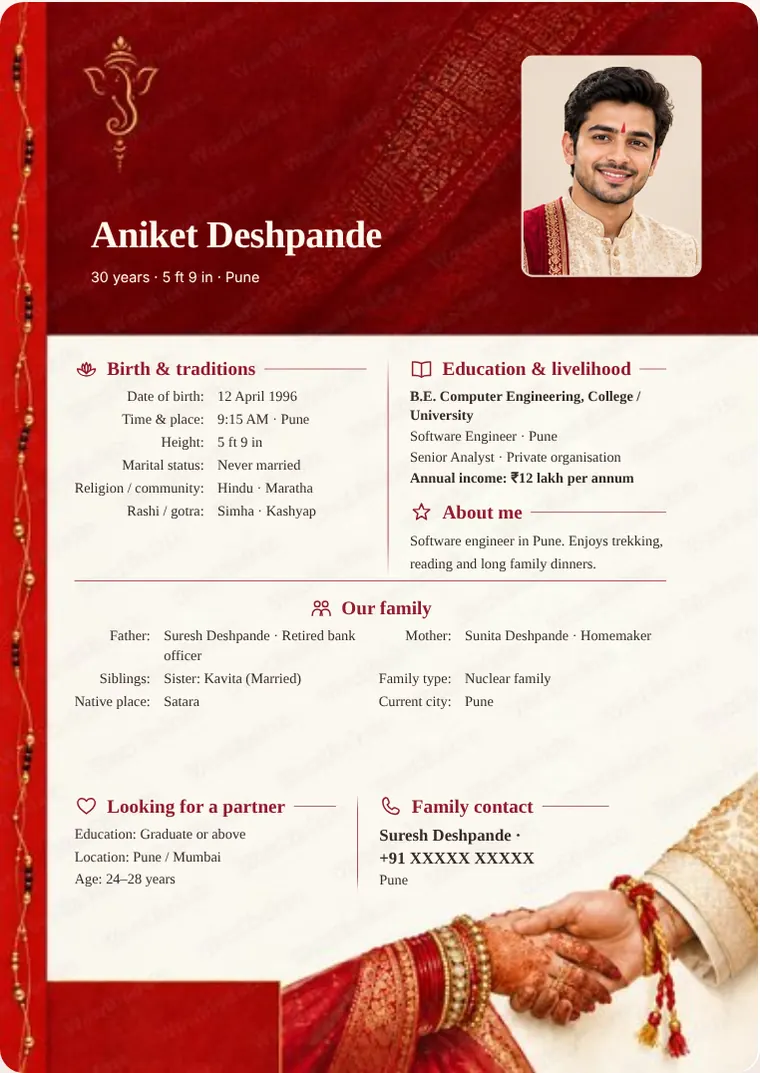
Hindu Marriage Biodata Format – sample marriage biodata in the Royal Ganesh design
Sample — Royal Ganesh
No regional keyboard needed

Type in English. Your biodata appears in your language.

Write names and places phonetically in English. Get editable suggestions in Marathi, Hindi, Gujarati, Tamil, Telugu, Kannada, Bengali, Punjabi or Urdu.

  • Works with any phone or laptop keyboard — nothing to install
  • Spells family names the way families write them
  • Switch the whole biodata to another language in one tap

We don’t store your photo or biodata

No account, no uploads. Everything is built right here in your browser — on your phone or your computer — so not even we can see it.

  • No sign-up, no phone number
  • Your photo and details are never uploaded
  • Drafts are kept only in this browser
Built for this

The details that actually matter

Ten languages

Marathi, Hindi, Gujarati, Tamil, Telugu, Kannada, Bengali, Punjabi, Urdu and English.

Print PDF and share image

An A4 PDF for printing and a sharp image sized for WhatsApp. Both match the preview exactly.

Photo that fits

Drag to reposition, use the slider to zoom. Every design reshapes the frame around your photo — or drops it neatly if you skip one.

Hindu Marriage Biodata Format

Hindu Marriage Biodata Format: questions and answers

What should a Hindu marriage biodata include?

The blessing line, personal details with birth time and place, horoscope details (rashi, nakshatra, gotra, gan, nadi, manglik), education and work, family details, a short line of expectations and one contact. Horoscope details are optional if your family does not follow them.

Which blessing line goes at the top of a Hindu biodata?

“॥ श्री गणेशाय नमः ॥” is the most common. Some families use “॥ श्री ॥”, their kuldevata’s name, or a line for Balaji, Shiva or Devi. In WowBiodata you pick one or type your own.

Is it necessary to mention manglik status?

Only if your family follows horoscope matching. If you include it, write Yes, No or Anshik (partial) exactly as the patrika says.

Can I make a Hindu biodata in Marathi or Hindi?

Yes. Type in English and choose the Marathi, Hindi, Gujarati, Tamil, Telugu, Kannada or Bengali spelling. The labels and the blessing line change with the language.

Do I need a photo on a Hindu biodata?

No. Every design rearranges itself neatly without a photo. If you add one, use a recent, clear photo; it stays on your phone and is never uploaded.

What is kuldaivat in a Marathi biodata?

Kuldaivat is the family deity — for example Khandoba of Jejuri, Tulja Bhavani or Ekvira Devi. Maharashtrian families often list it with the devak; both are optional fields in WowBiodata.

FAQ

Questions families ask

Is it free?

Making and previewing your biodata is free — every design, every language, no sign-up. When you are happy with it, download it without the watermark for a one-time ₹19 to ₹99 depending on the design. 2 designs are completely free.

Can I correct my biodata after paying?

Yes. Your purchase covers one design for one person and includes 2 downloads in total. Correct spellings or details and use the remaining download for the updated version. PDF, image and WhatsApp exports share this allowance; after both downloads, another export needs a new payment. Use the same browser on the same phone or computer for your second download. If a genuine name or date-of-birth correction is blocked, contact us.

Which languages can I make my biodata in?

Marathi, Hindi, Gujarati, Tamil, Telugu, Kannada, Bengali, Punjabi, Urdu and English. Type names phonetically in English, review the spelling suggestion, and edit any word.

Is my information safe?

Your biodata is made inside your own browser. Nothing you type and no photo is uploaded or stored on a server — not even we can see it.

Can I print it or send it on WhatsApp?

Both. Download an A4 PDF for printing, or a sharp image sized for WhatsApp.

Do I have to add a photo?

No. Every design re-arranges itself neatly when there is no photo — you never get an empty frame.

Are there designs for my religion?

Yes — Hindu, Muslim, Christian, Sikh, Jain and Buddhist designs, each with its own blessing line and the fields your community usually lists, like rashi and gotra, sect, or church.

Ready when you are

Nothing to install. Nothing to sign up for.