We don’t store your photo or biodataNo sign-up, no phone number · Your photo and details are never uploaded

The marriage biodata format families expect

Six sections in the order families read them, what to write in each, and a filled sample — then make yours in minutes, in your own language.

Free to create and preview. 2 free designs · Premium downloads ₹19–₹99

Type in English — it writes itself in your language→
  • Your photo and details are never uploaded
  • No sign-up required
Guides

What goes in a marriage biodata

A marriage biodata is a one-page profile of a person who is looking to marry, shared between families — on paper or on WhatsApp — before the first meeting. It lists personal details, horoscope details if the family follows them, education and work, family background, partner expectations and a contact.

Across India a biodata is read in much the same order, so a familiar format makes yours quick to read, easy to forward and simple for elders to compare. Here is that order, what to write in each section, and a filled sample.

  1. Personal details

    Full name, date of birth, time and place of birth, height, marital status, religion and community. Complexion and blood group only if your family usually includes them.

  2. Horoscope (if your family follows it)

    Rashi, nakshatra, gotra, gan, nadi, charan, manglik status and kuldaivat. If it does not apply, leave the whole section out — the biodata is complete without it.

  3. Education and career

    Highest degree and college, occupation, employer and city. Annual income is optional; many families write a range or leave it for the conversation.

  4. Family

    Father’s and mother’s names and occupations, brothers and sisters (married or unmarried), family type, native place and current city.

  5. Partner preferences

    A short, courteous line or two: education, location, age range, and anything that truly matters to you.

  6. Contact

    One family contact person with a mobile number, and the city or area. A full street address can wait for the first call.

Marriage biodata format: sections, what to write and examples
SectionWhat to writeExample
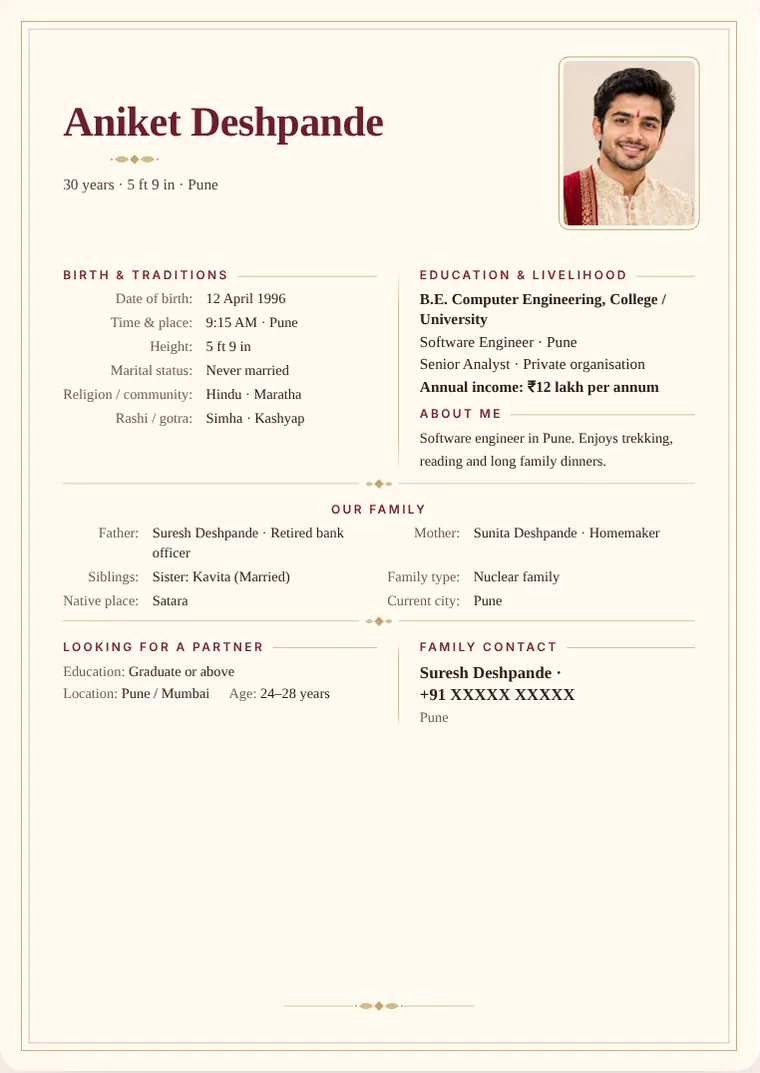
Personal detailsName, date, time and place of birth, height, marital statusAniket Deshpande · 12 Apr 1996, 9:15 am, Pune · 5′9″
HoroscopeRashi, nakshatra, gotra, gan, nadi, manglik (if followed)Simha · Kashyap gotra · not manglik
EducationHighest degree and collegeB.E. Computer Engineering
CareerRole, employer, city; income optionalSenior Analyst, Pune · ₹12 lakh a year
FamilyParents, siblings, family type, native placeFather – Suresh Deshpande, retired bank officer · 1 sister (married) · native Satara
ExpectationsOne or two courteous linesGraduate, from Pune or Mumbai, family-oriented
ContactOne family contact and numberFather: +91 98xxxxxx10

How long should a marriage biodata be?

One page. Families print it, forward it on WhatsApp and read it on a phone screen, so a single A4 page in a clear layout works best. If you have more to say, keep it for the conversation.

Which language should it be in?

The language the elders of both families read most comfortably. WowBiodata lets you type in English and set the whole biodata — labels included — in Marathi, Hindi, Gujarati, Tamil, Telugu, Kannada, Bengali, Punjabi, Urdu or English, and switch between them in one tap.

PDF or image?

Both. Download an A4 PDF to print or email, and a WhatsApp-sized image to forward. With WowBiodata both are made from the same biodata.

Do I need horoscope details?

Only if your family follows kundali matching. Then write rashi, nakshatra and charan, gan, nadi, gotra and manglik status exactly as the janam patrika shows, with the birth time and place. If your family does not, leave the section out; many families today do.

What order do families read a biodata in?

Almost everyone reads the name and photo first, then age and height, then education and work, then the family. Horoscope details are read by the elders or the astrologer. Put the most important facts where the eye lands first and keep each section short.

Biodata formats by region

The sections are much the same across India, but the details differ: Maharashtrian biodatas often list kuldaivat and the maternal uncle; Gujarati ones the native village and samaj; South Indian ones the nakshatra and gotra prominently; Punjabi ones the got and city abroad. Our faith and language pages cover these differences.

“About me” line examples

  • “Calm, family-oriented software engineer who enjoys cooking for friends and weekend treks in the Sahyadris.”
  • “Doctor at a Pune hospital; loves Hindustani music, travel and long conversations over chai.”
  • “Chartered accountant in Ahmedabad, close to her family, who reads widely and volunteers on Sundays.”
  • “Teacher by choice, cricketer at heart, and the person relatives call for every family function.”

Good to know

  • Keep it to one page — families print it and forward it on WhatsApp.
  • Use a recent, well-lit photo with a plain background. A biodata without a photo is perfectly fine too.
  • Write names the way your family writes them. Type in English and WowBiodata spells them in Marathi, Hindi, Gujarati, Tamil, Telugu, Kannada, Bengali or Urdu.
  • Leave out anything you would not want forwarded: ID numbers, salary slips, a full street address.

Common mistakes to avoid

  • Writing more than one page — families stop reading.
  • Leaving out birth time and place while listing rashi and nakshatra.
  • Sharing ID numbers, salary slips or a full street address.
  • Using an old or heavily filtered photo.
  • Mixing two scripts on one page.
Marriage Biodata Format – sample marriage biodata in the Classic Ivory design
Sample — Classic Ivory
How it works

Three steps, about 5 minutes

  1. 1

    Fill in your details

    A guided form, one short step at a time. Skip anything you would rather not share.

  2. 2

    Pick a design

    100+ designs — royal, traditional, floral and modern. Your details flow into every one instantly.

  3. 3

    Send it

    Download a print-ready PDF or a WhatsApp-sized image. No sign-up, ever.

Choose a Design

100+ designs, each one a little wedding card

Made for Indian families, in their own language

Who is the biodata for?
Choose a collection
For every faith · Showing 6 of 44 designs
A small price for a new beginning

Less than a box of sweets — for the page that starts the first conversation

Make and preview every design free. Pay once, only for the design you download — no subscription, no sign-up.

Essential

₹19

Clean, simple layouts for an easy first introduction

per design · one-time

Classic

₹29

Classic layouts with colour and gentle decoration

per design · one-time

Designer

₹49

Illustrated, floral and faith designs

per design · one-time

Premium

₹79

Rich painted artwork

per design · one-time

Signature

₹99

Our richest painted and royal designs

per design · one-time

2 downloads · one design · one person

✦ Free to make and preview · pay only to download

2 designs are completely free.

No regional keyboard needed

Type in English. Your biodata appears in your language.

Write names and places phonetically in English. Get editable suggestions in Marathi, Hindi, Gujarati, Tamil, Telugu, Kannada, Bengali, Punjabi or Urdu.

  • Works with any phone or laptop keyboard — nothing to install
  • Spells family names the way families write them
  • Switch the whole biodata to another language in one tap

We don’t store your photo or biodata

No account, no uploads. Everything is built right here in your browser — on your phone or your computer — so not even we can see it.

  • No sign-up, no phone number
  • Your photo and details are never uploaded
  • Drafts are kept only in this browser
Built for this

The details that actually matter

Ten languages

Marathi, Hindi, Gujarati, Tamil, Telugu, Kannada, Bengali, Punjabi, Urdu and English.

Print PDF and share image

An A4 PDF for printing and a sharp image sized for WhatsApp. Both match the preview exactly.

Photo that fits

Drag to reposition, use the slider to zoom. Every design reshapes the frame around your photo — or drops it neatly if you skip one.

Marriage Biodata Format

Marriage Biodata Format: questions and answers

What is the format of a marriage biodata?

Personal details first, then horoscope details if your family follows them, education and career, family details, partner expectations and a contact — on one page, in that order.

What should I write in a marriage biodata?

Facts the other family needs for a first impression: name, birth details, height, education, work, parents and siblings, native place, a short line about yourself and one contact number.

Is a photo necessary on a biodata?

No. A recent, clear photo helps, but every WowBiodata design looks complete without one.

Can I make a marriage biodata in Word?

You can, but a designed PDF is easier: WowBiodata gives you an A4 PDF and a WhatsApp image in your language without any formatting work. Making and previewing is free.

Should I write my salary in the biodata?

It is optional. Many families write a range such as “12–14 LPA” or leave it for the conversation.

How do I make a biodata in Marathi or Hindi without a Marathi keyboard?

Type in English as it sounds — “Aniket”, “Pune” — and tap the Marathi or Hindi suggestion. Every field supports it.

FAQ

Questions families ask

Is it free?

Making and previewing your biodata is free — every design, every language, no sign-up. When you are happy with it, download it without the watermark for a one-time ₹19 to ₹99 depending on the design. 2 designs are completely free.

Can I correct my biodata after paying?

Yes. Your purchase covers one design for one person and includes 2 downloads in total. Correct spellings or details and use the remaining download for the updated version. PDF, image and WhatsApp exports share this allowance; after both downloads, another export needs a new payment. Use the same browser on the same phone or computer for your second download. If a genuine name or date-of-birth correction is blocked, contact us.

Which languages can I make my biodata in?

Marathi, Hindi, Gujarati, Tamil, Telugu, Kannada, Bengali, Punjabi, Urdu and English. Type names phonetically in English, review the spelling suggestion, and edit any word.

Is my information safe?

Your biodata is made inside your own browser. Nothing you type and no photo is uploaded or stored on a server — not even we can see it.

Can I print it or send it on WhatsApp?

Both. Download an A4 PDF for printing, or a sharp image sized for WhatsApp.

Do I have to add a photo?

No. Every design re-arranges itself neatly when there is no photo — you never get an empty frame.

Are there designs for my religion?

Yes — Hindu, Muslim, Christian, Sikh, Jain and Buddhist designs, each with its own blessing line and the fields your community usually lists, like rashi and gotra, sect, or church.

Ready when you are

Nothing to install. Nothing to sign up for.