We don’t store your photo or biodataNo sign-up, no phone number · Your photo and details are never uploaded

How to make a marriage biodata, step by step

Seven steps, about fifteen minutes, and a biodata your family will be happy to forward — in English or your own language.

Free to create and preview. 2 free designs · Premium downloads ₹19–₹99

Type in English — it writes itself in your language→
  • Your photo and details are never uploaded
  • No sign-up required
Guides

Making a marriage biodata in 7 steps

To make a marriage biodata, collect the person’s birth, education, work and family details, write them on one page in the order families expect, add a recent photo if you wish, pick a design, check every spelling, and download it as a PDF to print and an image to send on WhatsApp.

Most families make a biodata once and then forward it dozens of times, so a little care at the start pays off. Here is the order that works.

  1. Collect the details first

    Before you open any design, gather the date, time and place of birth, height, highest degree and college, current job and city, parents’ names and occupations, siblings, native place, and the janam patrika if your family follows horoscopes.

  2. Choose the language

    Choose the language the elders on both sides read most easily. In WowBiodata you type in English — “Aniket Deshpande”, “Nashik” — and pick the Marathi, Hindi, Gujarati, Tamil, Telugu, Kannada, Bengali, Punjabi or Urdu spelling.

  3. Fill in the sections in order

    Personal details, horoscope (only if followed), education and work, family, expectations, contact. Skip anything you would rather not share; nothing is compulsory except the name.

  4. Write the “about me” line

    One or two natural sentences about work and interests. It is the only part of the biodata that sounds like a person — keep it honest and simple.

  5. Add a photo (optional)

    A recent photo in natural light with the face clearly visible. Crop and position it in the editor. It stays on your phone; nothing is uploaded.

  6. Pick a design

    Preview every design with your own details, free. Choose by what the family likes — traditional, royal, floral, modern or one made for your faith.

  7. Check, then download

    Read every name, date and number once more in the preview. Then download an A4 PDF for printing and a WhatsApp image for sharing. A paid design includes one more download for corrections.

What to collect before you start
DetailWhere to find itNeeded for
Birth date, time, placeBirth certificate or janam patrikaPersonal and horoscope sections
Rashi, nakshatra, gotraJanam patrikaHoroscope section (optional)
HeightMeasure in feet-inches or cmPersonal section
Degree and collegeMark sheet or degree certificateEducation section
Job title, employer, cityOffer letter or ID cardCareer section
Parents’ and siblings’ detailsFamilyFamily section
One contact numberA parent or elder siblingContact section

Good to know

  • Do it on a phone or computer — the editor works the same on both, with no app to install and no sign-up.
  • Your draft is saved in the browser as you type, so you can stop and continue later on the same device.
  • If you are unsure of a horoscope detail, leave it out rather than guess.
  • Ask one relative to read the preview before you download.

Common mistakes to avoid

  • Choosing a design before the details are ready, then fighting the layout.
  • Downloading before checking names and dates in the preview.
  • Using a different language for each section.
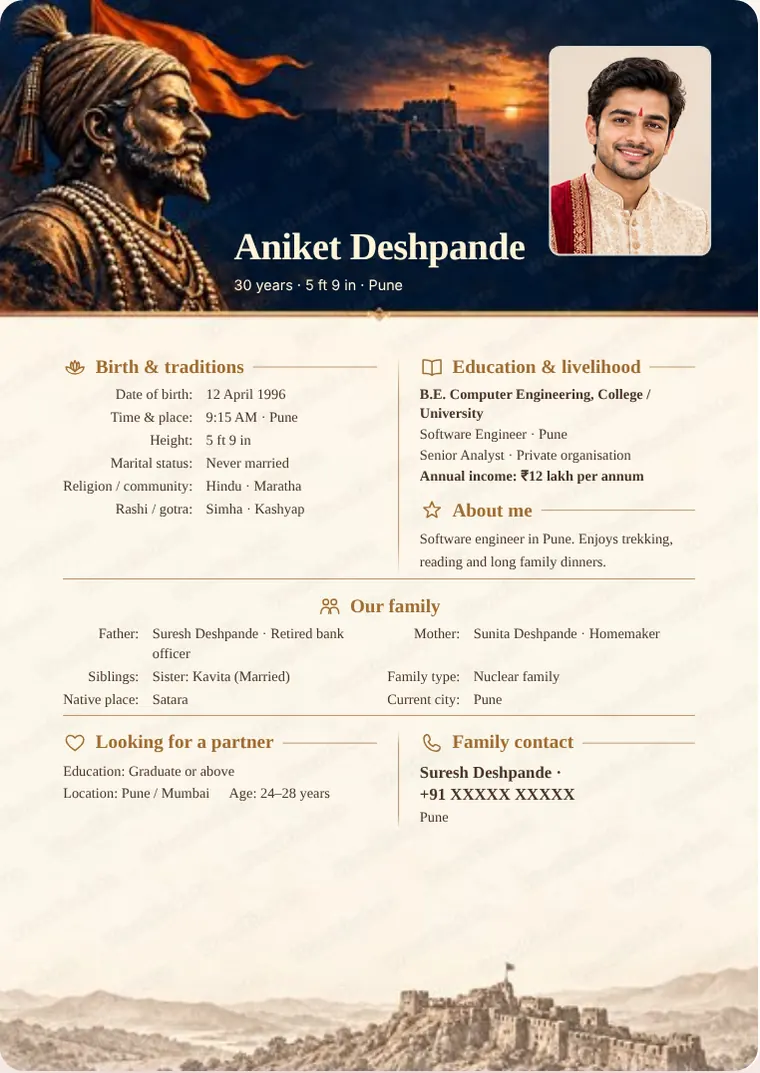
How to Make a Marriage Biodata – sample marriage biodata in the Shivrai Legacy design
Sample — Shivrai Legacy
How it works

Three steps, about 5 minutes

  1. 1

    Fill in your details

    A guided form, one short step at a time. Skip anything you would rather not share.

  2. 2

    Pick a design

    100+ designs — royal, traditional, floral and modern. Your details flow into every one instantly.

  3. 3

    Send it

    Download a print-ready PDF or a WhatsApp-sized image. No sign-up, ever.

Choose a Design

100+ designs, each one a little wedding card

Made for Indian families, in their own language

Who is the biodata for?
Choose a collection
For every faith · Showing 6 of 44 designs
A small price for a new beginning

Less than a box of sweets — for the page that starts the first conversation

Make and preview every design free. Pay once, only for the design you download — no subscription, no sign-up.

Essential

₹19

Clean, simple layouts for an easy first introduction

per design · one-time

Classic

₹29

Classic layouts with colour and gentle decoration

per design · one-time

Designer

₹49

Illustrated, floral and faith designs

per design · one-time

Premium

₹79

Rich painted artwork

per design · one-time

Signature

₹99

Our richest painted and royal designs

per design · one-time

2 downloads · one design · one person

✦ Free to make and preview · pay only to download

2 designs are completely free.

No regional keyboard needed

Type in English. Your biodata appears in your language.

Write names and places phonetically in English. Get editable suggestions in Marathi, Hindi, Gujarati, Tamil, Telugu, Kannada, Bengali, Punjabi or Urdu.

  • Works with any phone or laptop keyboard — nothing to install
  • Spells family names the way families write them
  • Switch the whole biodata to another language in one tap

We don’t store your photo or biodata

No account, no uploads. Everything is built right here in your browser — on your phone or your computer — so not even we can see it.

  • No sign-up, no phone number
  • Your photo and details are never uploaded
  • Drafts are kept only in this browser
Built for this

The details that actually matter

Ten languages

Marathi, Hindi, Gujarati, Tamil, Telugu, Kannada, Bengali, Punjabi, Urdu and English.

Print PDF and share image

An A4 PDF for printing and a sharp image sized for WhatsApp. Both match the preview exactly.

Photo that fits

Drag to reposition, use the slider to zoom. Every design reshapes the frame around your photo — or drops it neatly if you skip one.

How to Make a Marriage Biodata

How to Make a Marriage Biodata: questions and answers

How do I make a marriage biodata online for free?

Open WowBiodata, fill in the guided form, and preview your biodata in any design — free, with no sign-up. Two designs are free to download as well; the others are a one-time ₹19–₹99.

How long does it take to make a biodata?

About 10–15 minutes if you have the details ready; the form takes you one short step at a time.

Can I make a biodata on my phone?

Yes. Everything — typing, photo cropping, preview and download — works in the phone’s browser.

Can I edit my biodata after downloading?

Your draft stays in the browser, so you can change it any time. For a premium design, one payment includes one more download after corrections.

What is the best format for a marriage biodata?

One page in this order: personal details, horoscope (if followed), education and work, family, expectations and contact.

FAQ

Questions families ask

Is it free?

Making and previewing your biodata is free — every design, every language, no sign-up. When you are happy with it, download it without the watermark for a one-time ₹19 to ₹99 depending on the design. 2 designs are completely free.

Can I correct my biodata after paying?

Yes. Your purchase covers one design for one person and includes 2 downloads in total. Correct spellings or details and use the remaining download for the updated version. PDF, image and WhatsApp exports share this allowance; after both downloads, another export needs a new payment. Use the same browser on the same phone or computer for your second download. If a genuine name or date-of-birth correction is blocked, contact us.

Which languages can I make my biodata in?

Marathi, Hindi, Gujarati, Tamil, Telugu, Kannada, Bengali, Punjabi, Urdu and English. Type names phonetically in English, review the spelling suggestion, and edit any word.

Is my information safe?

Your biodata is made inside your own browser. Nothing you type and no photo is uploaded or stored on a server — not even we can see it.

Can I print it or send it on WhatsApp?

Both. Download an A4 PDF for printing, or a sharp image sized for WhatsApp.

Do I have to add a photo?

No. Every design re-arranges itself neatly when there is no photo — you never get an empty frame.

Are there designs for my religion?

Yes — Hindu, Muslim, Christian, Sikh, Jain and Buddhist designs, each with its own blessing line and the fields your community usually lists, like rashi and gotra, sect, or church.

Ready when you are

Nothing to install. Nothing to sign up for.